Tyler Gray

headshot of Tyler

Home

About

Testimonials

Contact

Share ETA

Native Mobile App DesignTimeline ~3 months

preview of share ETA

Team & Role

This feature did not exist in the mobile app prior to the beginning of the project. I was the sole UX designer for this project. My responsibilities spanned discovery, interaction design, visual design, developer collaboration, and guiding implementation through to production.

Customers

Linxup serves industries including landscaping, construction, HVAC, plumbing, towing, pest control, delivery, emergency services, trucking, utilities, and more. Fleet managers — classified as Admin user types — are the primary users of the features covered in this case study.

User Story and Pain Points

As a fleet manager, I would like to send a shareable link to our customers with the location and ETA of my drivers so that I can instill confidence in our customers by demonstrating a commitment to respecting their time.


The only way to Share ETA on the web app was by generating an email or by copying a link from a computer

The core problem was a communication gap between fleet managers, their drivers, and their customers:

  • Customers called fleet managers to ask for driver ETAs or whereabouts, pulling managers away from productive work.
  • Broad time windows and a lack of proactive communication disrupted customers' schedules, creating frustration and confusion for support staff, dispatchers, drivers, and end customers alike.
  • Fleet managers had no easy way to delegate this visibility — they had to relay information themselves, often approximating based on the map.

Business Needs

Share ETA strengthens Linxup's value proposition as a differentiator. By reducing inbound customer calls and improving the experience for the fleet manager's own customers, it demonstrates measurable ROI and increases the stickiness of the product. This directly aligns with the Visibility Always initiative and the long-term goal of becoming the leading fleet management provider for SMBs.

Quantitative Findings

16% of admin users adopted the Share ETA feature in the existing web app. This relatively low adoption rate highlighted an opportunity to improve both discoverability and the quality of the mobile interaction.

Challenges

The breadth of expiration options — each with its own conditional sub-fields — made fitting all necessary information into a single mobile form difficult. Early iterations spread the configuration across multiple pages, which added friction and made it hard for users to verify their settings before creating the link.


During early reviews, stakeholders noted that having multiple pages for the Stop Sharing configuration felt like too many steps, and that users couldn't see all the link details at once before confirming creation.

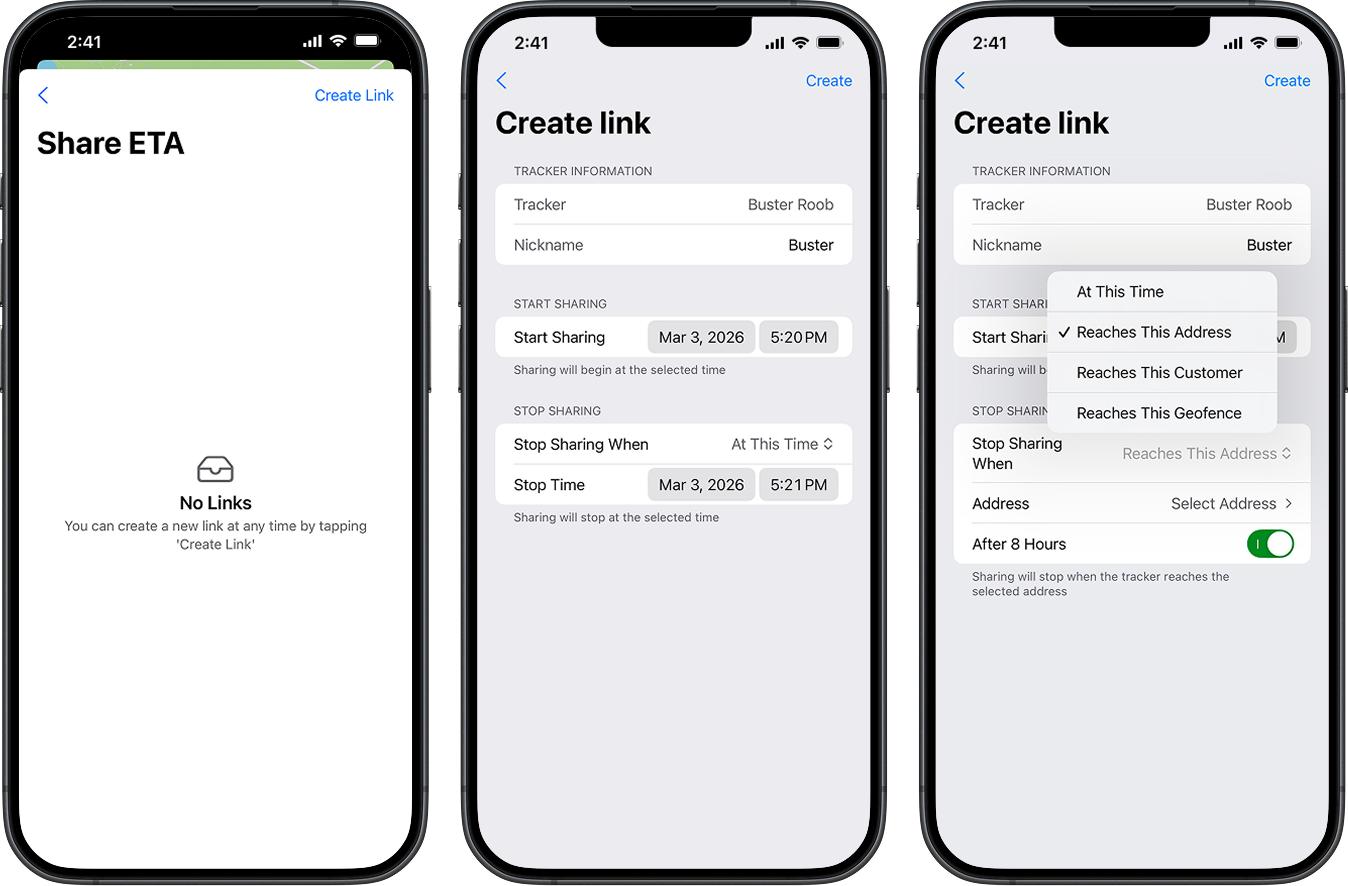
The creation form was simplified into a single page using inline native components

Final Design

The 'Stop Sharing When' selector used a native segmented or picker control to surface all four expiration options (At This Time, Reaches This Address, Reaches This Customer, Reaches This Geofence) without navigating away. Conditional fields appeared inline when a geofence or customer was selected. An 'After 8 Hours' toggle and a Custom Time field provided fallback options. The Share ETA list view used a consistent card pattern showing the stop-sharing condition and expiration timestamp for each active link, with a swipe-to-delete gesture for removal.
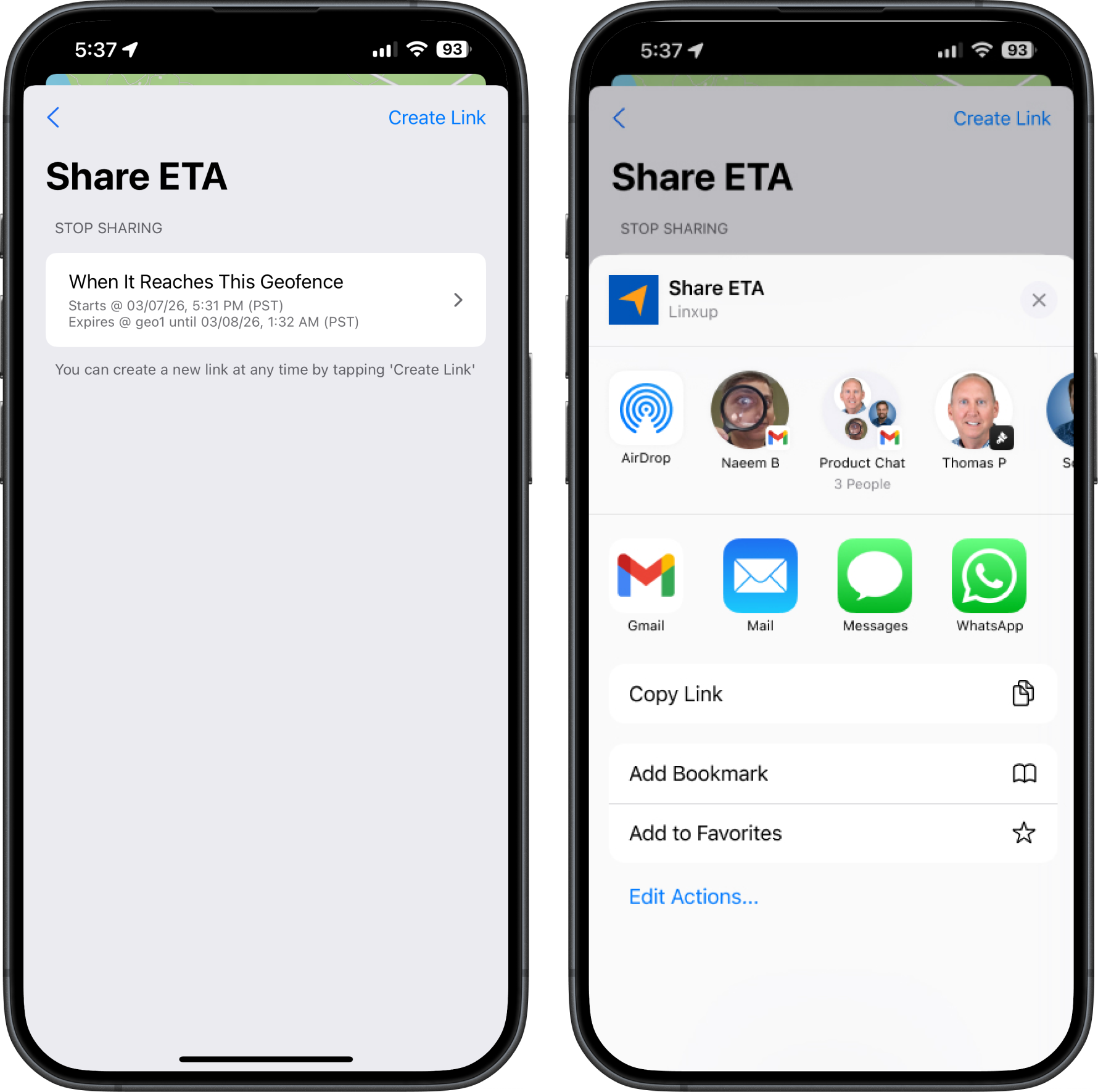
All they have to do to share the link is tap on their newly created item and choose what platform they would like to share it with.

All they have to do to share the link is tap on their newly created item and choose what platform they would like to share it with. The link contains the estimated time of arrival, the location of their driver, and when the link will expire.

Launched!

Share ETA launched in production on iOS and Android. 17% of admin users adopted the feature — on par with web app adoption, and significant given it is a net-new mobile capability. The feature is actively contributing to Linxup's Visibility Always initiative.

Learnings

This project deepened my ability to collaborate with developers as a partner rather than a handoff recipient. Developers have constraints and platform knowledge that can unlock design solutions — understanding native component capabilities directly shaped the final form design. Being the only designer means embracing that partnership fully.

Learn More About It

To protect any sensitive information, the full case study is in a presentation format. Please contact if you’d like to learn more!

headshot of Tyler

Tyler Gray

Share ETA

Native Mobile App DesignTimeline ~3 months

preview of share ETA

Team & Role

This feature did not exist in the mobile app prior to the beginning of the project. I was the sole UX designer for this project. My responsibilities spanned discovery, interaction design, visual design, developer collaboration, and guiding implementation through to production.

Customers

Linxup serves industries including landscaping, construction, HVAC, plumbing, towing, pest control, delivery, emergency services, trucking, utilities, and more. Fleet managers — classified as Admin user types — are the primary users of the features covered in this case study.

Fleet manager generates a shareable link for the recently dispatched driver.

Link is sent to the customer by email or by copying and pasting the link into a messaging platform

The recipient opens the link and can track the whereabouts and see an ETA for their driver

User Story and Pain Points

As a fleet manager, I would like to send a shareable link to our customers with the location and ETA of my drivers so that I can instill confidence in our customers by demonstrating a commitment to respecting their time.


The only way to Share ETA on the web app was by generating an email or by copying a link from a computer

The core problem was a communication gap between fleet managers, their drivers, and their customers:

  • Customers called fleet managers to ask for driver ETAs or whereabouts, pulling managers away from productive work.
  • Broad time windows and a lack of proactive communication disrupted customers' schedules, creating frustration and confusion for support staff, dispatchers, drivers, and end customers alike.
  • Fleet managers had no easy way to delegate this visibility — they had to relay information themselves, often approximating based on the map.

Business Needs

Share ETA strengthens Linxup's value proposition as a differentiator. By reducing inbound customer calls and improving the experience for the fleet manager's own customers, it demonstrates measurable ROI and increases the stickiness of the product. This directly aligns with the Visibility Always initiative and the long-term goal of becoming the leading fleet management provider for SMBs.

Quantitative Findings

16% of admin users adopted the Share ETA feature in the existing web app. This relatively low adoption rate highlighted an opportunity to improve both discoverability and the quality of the mobile interaction.

Challenges

The breadth of expiration options — each with its own conditional sub-fields — made fitting all necessary information into a single mobile form difficult. Early iterations spread the configuration across multiple pages, which added friction and made it hard for users to verify their settings before creating the link.


During early reviews, stakeholders noted that having multiple pages for the Stop Sharing configuration felt like too many steps, and that users couldn't see all the link details at once before confirming creation.

The creation form was simplified into a single page using inline native components

Final Design

The 'Stop Sharing When' selector used a native segmented or picker control to surface all four expiration options (At This Time, Reaches This Address, Reaches This Customer, Reaches This Geofence) without navigating away. Conditional fields appeared inline when a geofence or customer was selected. An 'After 8 Hours' toggle and a Custom Time field provided fallback options. The Share ETA list view used a consistent card pattern showing the stop-sharing condition and expiration timestamp for each active link, with a swipe-to-delete gesture for removal.

All they have to do to share the link is tap on their newly created item and choose what platform they would like to share it with.

All they have to do to share the link is tap on their newly created item and choose what platform they would like to share it with. The link contains the estimated time of arrival, the location of their driver,and when the link will expire.

Launched!

Share ETA launched in production on iOS and Android. 17% of admin users adopted the feature — on par with web app adoption, and significant given it is a net-new mobile capability. The feature is actively contributing to Linxup's Visibility Always initiative.

Learnings

This project deepened my ability to collaborate with developers as a partner rather than a handoff recipient. Developers have constraints and platform knowledge that can unlock design solutions — understanding native component capabilities directly shaped the final form design. Being the only designer means embracing that partnership fully.

Learn More About It

To protect any sensitive information, the full case study is in a presentation format. Please contact if you’d like to learn more!

headshot of Tyler

Tyler Gray

Share ETA

Native Mobile App DesignTimeline ~3 months

preview of share ETA

Team & Role

This feature did not exist in the mobile app prior to the beginning of the project. I was the sole UX designer for this project. My responsibilities spanned discovery, interaction design, visual design, developer collaboration, and guiding implementation through to production.

Customers

Linxup serves industries including landscaping, construction, HVAC, plumbing, towing, pest control, delivery, emergency services, trucking, utilities, and more. Fleet managers — classified as Admin user types — are the primary users of the features covered in this case study.

Fleet manager generates a shareable link for the recently dispatched driver.

Link is sent to the customer by email or by copying and pasting the link into a messaging platform

The recipient opens the link and can track the whereabouts and see an ETA for their driver

User Story and Pain Points

As a fleet manager, I would like to send a shareable link to our customers with the location and ETA of my drivers so that I can instill confidence in our customers by demonstrating a commitment to respecting their time.


The only way to Share ETA on the web app was by generating an email or by copying a link from a computer

The core problem was a communication gap between fleet managers, their drivers, and their customers:

  • Customers called fleet managers to ask for driver ETAs or whereabouts, pulling managers away from productive work.
  • Broad time windows and a lack of proactive communication disrupted customers' schedules, creating frustration and confusion for support staff, dispatchers, drivers, and end customers alike.
  • Fleet managers had no easy way to delegate this visibility — they had to relay information themselves, often approximating based on the map.

Business Needs

Share ETA strengthens Linxup's value proposition as a differentiator. By reducing inbound customer calls and improving the experience for the fleet manager's own customers, it demonstrates measurable ROI and increases the stickiness of the product. This directly aligns with the Visibility Always initiative and the long-term goal of becoming the leading fleet management provider for SMBs.

Quantitative Findings

16% of admin users adopted the Share ETA feature in the existing web app. This relatively low adoption rate highlighted an opportunity to improve both discoverability and the quality of the mobile interaction.

Challenges

The breadth of expiration options — each with its own conditional sub-fields — made fitting all necessary information into a single mobile form difficult. Early iterations spread the configuration across multiple pages, which added friction and made it hard for users to verify their settings before creating the link.


During early reviews, stakeholders noted that having multiple pages for the Stop Sharing configuration felt like too many steps, and that users couldn't see all the link details at once before confirming creation.

The creation form was simplified into a single page using inline native components

Final Design

The 'Stop Sharing When' selector used a native segmented or picker control to surface all four expiration options (At This Time, Reaches This Address, Reaches This Customer, Reaches This Geofence) without navigating away. Conditional fields appeared inline when a geofence or customer was selected. An 'After 8 Hours' toggle and a Custom Time field provided fallback options. The Share ETA list view used a consistent card pattern showing the stop-sharing condition and expiration timestamp for each active link, with a swipe-to-delete gesture for removal.

All they have to do to share the link is tap on their newly created item and choose what platform they would like to share it with.

All they have to do to share the link is tap on their newly created item and choose what platform they would like to share it with. The link contains the estimated time of arrival, the location of their driver,and when the link will expire.

Launched!

Share ETA launched in production on iOS and Android. 17% of admin users adopted the feature — on par with web app adoption, and significant given it is a net-new mobile capability. The feature is actively contributing to Linxup's Visibility Always initiative.

Learnings

This project deepened my ability to collaborate with developers as a partner rather than a handoff recipient. Developers have constraints and platform knowledge that can unlock design solutions — understanding native component capabilities directly shaped the final form design. Being the only designer means embracing that partnership fully.

Learn More About It

To protect any sensitive information, the full case study is in a presentation format. Please contact if you’d like to learn more!